Security Alarm Manufacturers vs. Security System Manufacturers: A Central-Station Interoperability Guide to Commercial Intrusion Panels and Distributor-Ready Deployment
A commercial intrusion panel rarely fails because the enclosure is cheap or the zone count is low. It fails at the seams — between the communicator and the receiver, between the event code and the operator’s screen, between the failover claim on the datasheet and what actually happens when the primary path drops. For a distributor, importer, or systems integrator, the manufacturer that matters is the one that has engineered those seams, not just the panel.
That is the real evaluation question behind “which security alarm manufacturer should we work with”: can this vendor support the full signal chain — detector → control panel → communicator → transport path → alarm receiver/CMS → operator workflow → multi-site rollout — or do they only make the box in the middle of it?
This guide is written for that evaluation. It covers what separates a hardware-only alarm panel supplier from a commercial intrusion system manufacturer, how Contact ID and SIA DC-09 actually behave in mixed-infrastructure deployments, how multi-path communication and RS-485 expansion architecture affect long-term serviceability, and what a distributor should test before rolling a panel line into a new market.
Why “Security Alarm Manufacturer” Selection Fails in Commercial Intrusion Projects
Most procurement comparisons stop at price, enclosure design, zone count, and the sensor bundle in the box. Those are the easiest things to compare on a datasheet, and the easiest things a factory can make look good in a sample shipment. They are also the least predictive of whether a panel line will perform once it is deployed across dozens of sites and reporting into a live monitoring center.
The risk that actually determines margin and support load over the next three years sits somewhere else:
| What buyers typically compare | What actually determines field performance |
|---|---|
| Price per panel | Total cost of ownership including truck rolls and RMAs |
| Zone count on the spec sheet | Expansion architecture and how zones scale past the base count |
| Case design / industrial look | Tamper, surge, and environmental protection under real conditions |
| Marketing claims of “IP + 4G + PSTN” | Whether failover is supervised and how it behaves under path loss |
| Sensor bundle included | Central-station reporting format and event-code mapping accuracy |
| Sample-unit performance | Firmware consistency and documentation across production batches |
A panel that looks identical to a competitor’s on a spec sheet can behave very differently once it is reporting Contact ID events through a communicator into a receiver that expects a specific account format. The manufacturer selection problem is really a monitoring-center interoperability problem wearing a hardware-procurement costume.
Why communication architecture matters more than a feature list
“Supports IP, 4G, and PSTN” is a marketing sentence. It says nothing about how the panel decides a path has failed, whether the central station’s receiver actually accepts the reporting format the communicator sends, whether heartbeat supervision exists at all, or whether the account and partition mapping stays consistent after a firmware update. Buyers who stop at the feature list are the ones who discover, six months into a rollout, that “supports 4G” meant the module exists — not that failover, supervision, and CMS compatibility were engineered together.
The hidden cost of skipping CMS validation
A manufacturer relationship that starts without protocol alignment and CMS validation tends to generate the same pattern of hidden costs:
- Repeated field reconfiguration after installation.
- Communication-fault events that turn out to be false.
- Monitoring-center confusion from mismatched zone or event labels.
- A 4G backup that never actually takes over when the primary path drops.
- Post-sales tickets that trace back to thin documentation rather than a defective unit.
None of these show up on a sample-unit demo. All of them show up in month four of a multi-site rollout, and by then they are the distributor’s problem, not the factory’s.
Security Alarm Manufacturer vs. Security System Manufacturer: What the Terms Actually Mean
The two terms get used interchangeably in sourcing conversations, but they describe different scopes of capability.
- Security alarm manufacturer, in the narrow sense, describes a company that produces alarm panels, detectors, and accessories as discrete hardware.
- Security system manufacturer, in the commercial intrusion sense that matters for distributors and monitoring companies, describes a company that also supports the panel platform, communication modules, monitoring-software or CMS integration path, deployment documentation, OEM/private-label services, and post-sales troubleshooting.
| Dimension | Generic hardware-oriented manufacturer | Commercial intrusion system manufacturer | Why it matters to distributors |
|---|---|---|---|
| Panel scope | Sells the box | Panel + communicator options + expansion modules as one platform | Determines whether you’re sourcing one SKU or a coherent product line |
| Central-station protocol support | Undocumented or vague | Documented reporting formats, tested against real receivers | Avoids discovering incompatibility after import |
| CMS compatibility | Untested | Validated event-code mapping and account structure | Reduces operator confusion and false dispatch |
| Communicator options | Single fixed module | PSTN / IP / cellular variants, mix-and-match | Lets one panel line cover legacy and modern sites |
| Failover design | Undocumented behavior | Documented supervision intervals and failback logic | Determines real resilience, not brochure resilience |
| Expansion architecture | Fixed zone count | Addressable bus expansion for large sites | Affects project sizing and future-proofing |
| Diagnostics | None | Event logs, black-box history, remote diagnostics | Shortens troubleshooting cycles |
| OEM capability | Cosmetic branding only | Firmware branding, localized manuals, SKU rationalization | Enables a private-label channel strategy |
| Post-sales support | Reactive, slow | Structured escalation to engineering | Determines support cost per unit sold |
What separates residential-grade from project-grade
The dividing line in practice is whether a panel supports multi-partition/multi-area management, addressable bus expansion beyond a fixed onboard zone count, structured central-station reporting with an audit trail, remote diagnostics, more than one communication path, and supervision for tamper, line cut, and battery faults. A panel that does all of that is built for commercial deployment. A panel that does none of it is a residential product wearing a commercial enclosure.
Where OEM manufacturing and deployment support intersect
OEM is not only a logo on a box. A manufacturer that takes OEM seriously handles firmware branding, localized installer manuals, carton and label customization, a defined spare-parts policy, and a real escalation path when a distributor’s technical team hits a CMS integration problem it can’t solve alone. A manufacturer that treats OEM as “we’ll print your logo on the enclosure” is handing you a support burden disguised as a private-label deal.
The Commercial Intrusion Signal Chain: From Detector Event to Central Station Response
Every commercial intrusion deployment is really one continuous chain, and a weak link anywhere in it produces the same symptom at the operator’s desk: an alarm that either never arrives, arrives without context, or arrives too late to matter.
Detector → Control Panel → Communicator → Transport Path → Alarm Receiver/CMS → Operator Workflow → Escalation
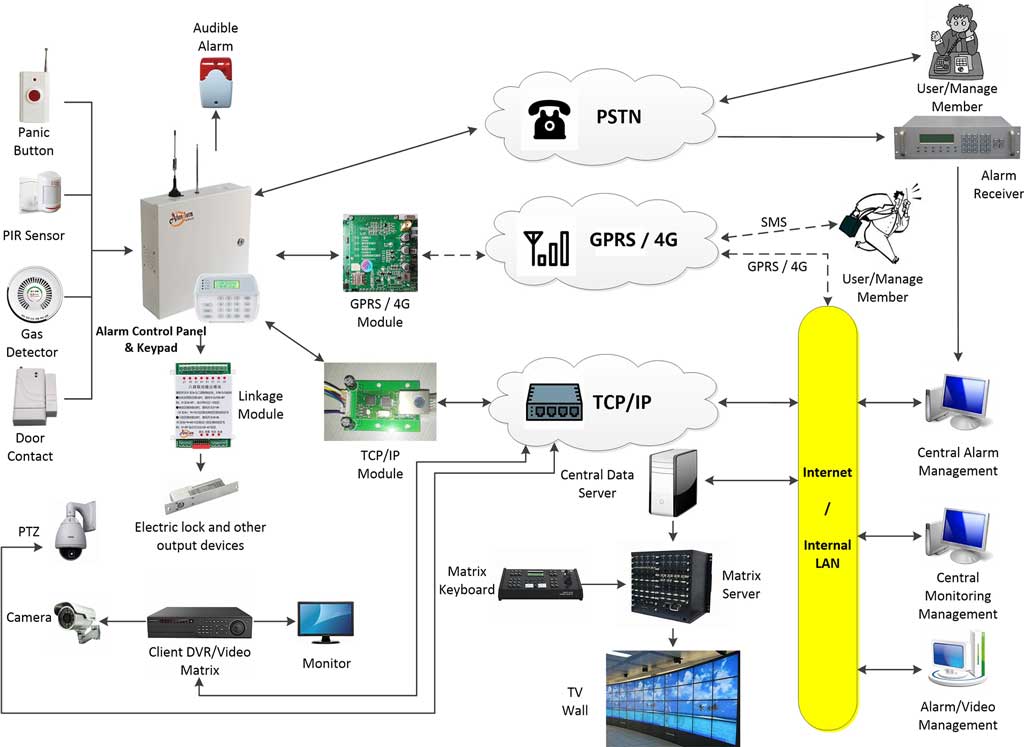
- Sensor layer: PIRs, door contacts, vibration detectors, panic buttons, and smoke/gas detectors are not interchangeable — some are burglary-focused, others are safety or environmental support devices, and how they’re deployed directly affects false-alarm rates and verification workflow downstream.
- Control layer: This is the operational brain: wired, wireless, and bus zones; zone typing and alarm logic; partition and area management; entry/exit timing; event prioritization; relay and siren output logic; and a local event buffer that becomes the first thing anyone checks during troubleshooting.
- Communication layer: This is where most interoperability problems actually live. Event data has to leave the panel over a primary path, with a backup path that activates on a defined threshold, supervised by heartbeat signals so the panel and the CMS both know the link is alive — not just present.
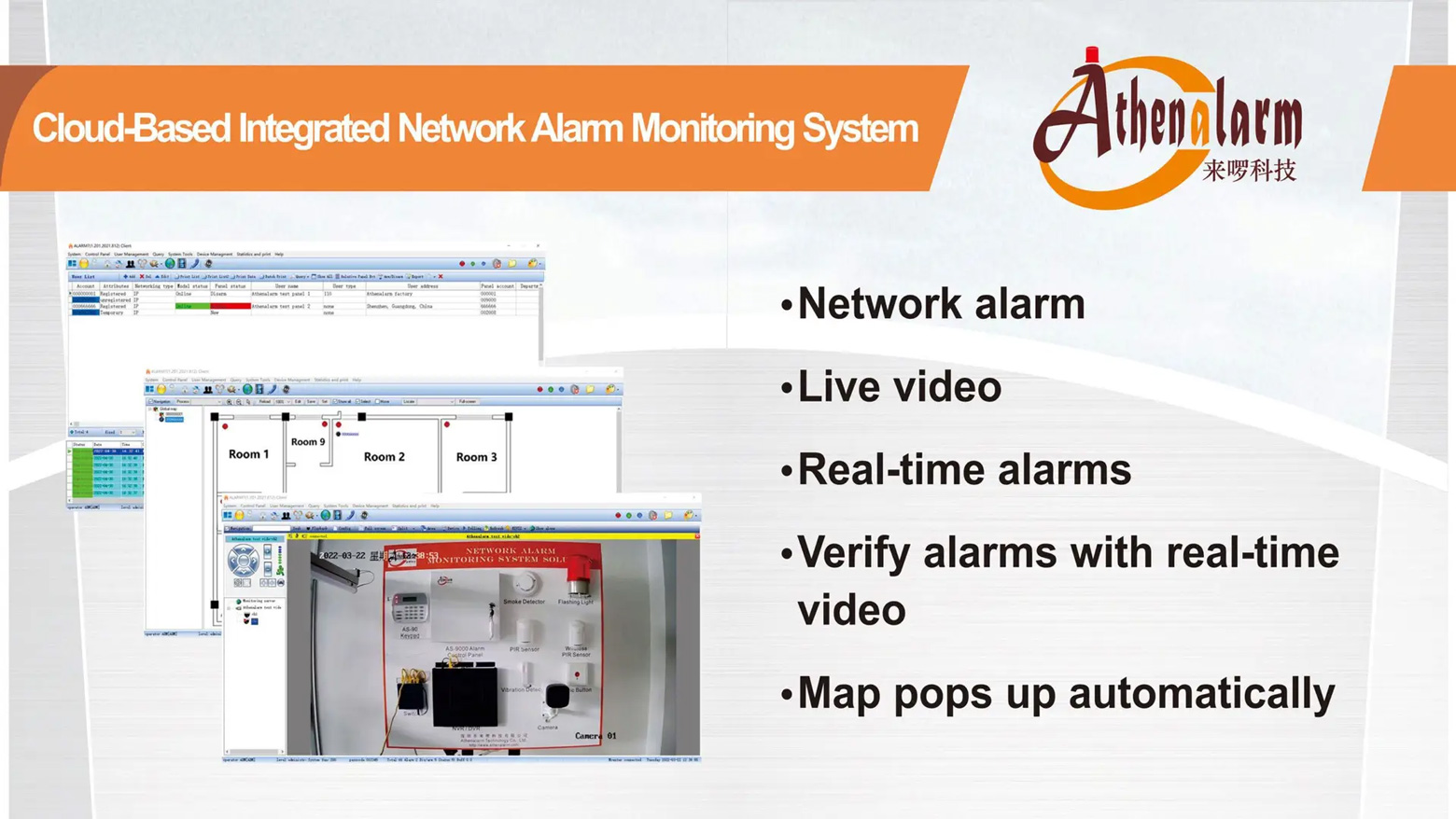
- Monitoring layer: The receiver or CMS parses the incoming format, presents it to an operator with usable zone and partition context, handles acknowledgment and escalation, and — where applicable — triggers video verification. This layer turns “the alarm was transmitted” into “the alarm was acted on,” which is the actual business outcome anyone is paying for.
| Layer | Function | Common failure mode | Buyer verification question |
|---|---|---|---|
| Sensor | Detect the event | False triggers, poor placement guidance | Does the manufacturer document deployment best practice per detector type? |
| Control panel | Process zones/partitions, apply logic | Ambiguous zone typing, no audit trail | Does it keep an event/black-box log independent of the CMS? |
| Communicator | Format and transmit the event | Wrong reporting format for the receiver | Is the reporting format documented and receiver-tested? |
| Transport path | Carry the signal (PSTN/IP/4G) | Silent path failure, no supervision | Is there a heartbeat, and what’s the interval? |
| Receiver/CMS | Parse and present the event | Mismatched account/zone mapping | Has this panel been validated against your specific receiver? |
| Operator workflow | Act on the event | Delayed or duplicate dispatch | Does the panel distinguish alarm vs. fault vs. supervisory events? |
What Professional Buyers Should Verify in a Commercial Alarm Panel Manufacturer
1. Central-station reporting compatibility
Confirm the reporting format the communicator actually sends, how event codes map to your receiver’s expectations, how account numbers and partition/zone names are structured, and — before rollout, not after — run an actual CMS validation test rather than trusting a datasheet claim. A panel that “supports Contact ID” in principle and a panel whose Contact ID output has been validated against your specific receiver are two different levels of assurance.
2. Communication redundancy
A resilient design means a defined primary path, a backup path with a documented activation threshold, heartbeat or polling intervals appropriate to the site’s risk level, clear communication-loss event thresholds, a sane test-signal policy, and defined failback behavior once the primary path recovers. If a manufacturer can’t describe these five things in specific terms, “dual-path” is a marketing word, not an engineering spec.
3. Expansion architecture
Base zone capacity is the least interesting number on the datasheet. What matters is how the system scales: addressable modules over an RS-485 bus, mixed wired/wireless deployment, and partitioned area design that lets one panel platform serve a small branch office and a large distribution warehouse without switching product lines. Architecture that scales cleanly reduces installation labor and future rewiring — architecture that doesn’t turns every expansion into a mini-redesign.
4. Serviceability
Look for an onboard event buffer (a “black box” history log), remote diagnostic capability, clearly categorized fault reporting (battery, AC loss, tamper, line cut, communication loss, module fault), and disciplined firmware revision control. Serviceability is what determines whether a fault gets resolved with a remote check or a truck roll.
5. Channel support
Private-label support, responsive pre-sales engineering, real wiring diagrams and protocol documentation (not marketing PDFs), installer training, and a defined escalation path for CMS troubleshooting are what let a distributor actually take a panel line to market rather than just take delivery of one.
| Evaluation category | What to verify | Risk if ignored |
|---|---|---|
| Central-station compatibility | Reporting format tested against your receiver | Panel “works” in the demo, fails at the CMS |
| Communication redundancy | Documented failover thresholds and failback logic | Backup path never actually activates |
| Expansion architecture | RS-485 addressable bus, mixed topology support | Every larger site becomes a custom project |
| Serviceability | Event logs, remote diagnostics, firmware discipline | Support tickets require a site visit every time |
| Channel support | Documentation, training, escalation path | Distributor absorbs the manufacturer’s support gap |
Alarm Communication Protocols in Practice: Contact ID, SIA DC-09, and Multi-Path Reporting
Where Contact ID still fits
Contact ID remains widely deployed and, in legacy and mixed telecom environments, it’s often the most practical common denominator between panel and receiver. Its limitation shows up in richer IP-native environments, where its data model is thinner than what modern CMS platforms and encrypted transport can support. “Still supported” is not the same claim as “still the best choice” — it’s a statement about compatibility with the infrastructure already in the field, particularly where PSTN lines or older receivers haven’t been retired.
Why SIA DC-09 matters for IP/cellular reporting
SIA DC-09 was designed for IP-oriented alarm transport, and it fits naturally into cellular and internet-connected reporting because it was built around that transport model rather than adapted onto it. For distributors moving into markets with more modern central-station infrastructure, confirming DC-09 or equivalent IP-native reporting support — and reading the manufacturer’s actual protocol documentation rather than assuming it from a “supports TCP/IP” bullet point — is part of the validation, not an afterthought.
Matching protocol to deployment type
A legacy bank branch still on PSTN, a retail chain mid-modernization, a new-build warehouse or campus, and a market with uneven telecom infrastructure all justify different protocol and transport decisions. The right answer is rarely “replace everything with IP” — it’s usually a staged migration where new sites go IP/cellular-first and legacy sites keep PSTN as a supervised fallback until the infrastructure around them changes.
What a manufacturer should document for CMS interoperability testing
A serious manufacturer can hand a distributor: the supported reporting formats, receiver compatibility notes, expected event-code behavior, heartbeat/supervision settings, account-format guidance, communicator configuration instructions, and a sample CMS validation test procedure. If that documentation doesn’t exist, the distributor is the one who will write it — after the first field failure.
| Protocol / Method | Typical transport | Commercial use case | Strengths | Limitations |
|---|---|---|---|---|
| Contact ID | PSTN, dialer-based | Legacy and mixed estates | Broad receiver compatibility, well understood | Thinner data model, less suited to IP-native environments |
| SIA DC-09 | IP / cellular | Modern monitored deployments | Built for IP transport, supports richer/encrypted reporting | Requires IP-native receiver support on the CMS side |
| Proprietary IP/cellular reporting | TCP/IP, 4G/LTE | New commercial rollouts | Can add supervision and richer event data | Depends entirely on documentation quality and receiver support |
Multi-Path Communication Architecture: Handling IP, PSTN, and 4G Failover
“Multi-path” should mean alarm-delivery continuity, not simply the presence of more than one radio in the enclosure. A primary path carries traffic under normal conditions; a backup path activates on a specific, documented threshold — not “eventually.”
When the primary path fails, a properly engineered panel detects the loss, applies a failover threshold rather than switching instantly on every minor hiccup, retries transmission, queues any alarm events generated during the transition, reports the path-failure event itself to the CMS, and fails back cleanly once the primary path is restored — without dropping or duplicating events in the process.
Daily test signals and heartbeat supervision exist to catch a silent line failure before it matters, but the interval has to be tuned: too aggressive, and the system generates nuisance communication-fault alarms that operators start ignoring; too relaxed, and a real failure goes unnoticed for hours. This is a tuning problem specific to each site’s network conditions, not a single global setting a panel ships with.
The business consequence of getting this wrong is concrete: missed event delivery, duplicate events, stale account status in the CMS, unresolved communication faults piling up in the operator queue, delayed dispatch, and — ultimately — more truck rolls and more support tickets landing on the distributor’s desk.
| Site type | Primary path | Backup path | Heartbeat strategy | Rationale |
|---|---|---|---|---|
| Legacy branch with PSTN infrastructure | PSTN (Contact ID) | Cellular | Daily test signal | Matches existing infrastructure, adds a modern fallback |
| New commercial build | IP (DC-09 or equivalent) | Cellular | Short-interval heartbeat | IP-native site, cellular as true failover |
| Remote/rural site | Cellular | PSTN if available, else none | Adjusted interval for network variability | Avoids nuisance faults from unstable rural connectivity |
Zone Scalability and Site Architecture: Why Expansion Design Matters More Than Raw Zone Count
A panel’s base zone count answers “how big is the box.” Its expansion architecture answers “how does this system grow with the project” — and that second question is the one that determines installation labor and long-term maintainability.
Wired zones remain preferable where cable runs are already planned or where reliability requirements are highest; wireless zones are practical for retrofit and hard-to-wire areas; and RS-485 bus-addressable expansion is what makes multi-room, multi-floor, and multi-building deployments tractable without running a dedicated home-run cable to every device. On an addressable bus, each module carries its own address, so fault isolation and future expansion don’t require rewiring the whole site — a technician can identify which module is reporting a fault without physically tracing cable.
Address modules, linkage modules, and partitioned area design map naturally onto real commercial layouts: branch offices, bank vault areas kept on a separate partition from public space, warehouse perimeter zones layered against internal zones, and tenant separation inside a shared commercial building.
Getting this architecture right up front changes the economics of everything downstream — cable runs, field troubleshooting time, replacement workflow, and whether a future expansion means adding a module or re-pulling wire through a finished building.
| Site type | Recommended architecture | Expansion method | Operational reason |
|---|---|---|---|
| Bank branch | Wired core + partitioned vault/ATM areas | Address modules per area | Security zoning must match access control logic |
| Retail chain store | Standardized wired/wireless mix | Repeatable template per site | Enables consistent multi-site rollout and support |
| Warehouse/logistics | Perimeter + internal layering | RS-485 addressable expansion | Large footprint, harsh environment, remote fault isolation |
| Campus/multi-building | Wired backbone, RS-485 across buildings | Bus expansion, area partitioning | Avoids home-run cabling between buildings |
Central Station Integration Checklist for Alarm Distributors and Monitoring Companies
Before a panel line goes live on any project — and certainly before it’s rolled into a new market — the following should be verified, in this order, not assumed:
12-Point Central Station Interoperability Checklist
- Supported reporting protocol confirmed against the receiver in use
- Receiver/CMS compatibility verified with an actual test transmission
- Account structure validated (numbering, length, format)
- Zone and partition naming plan agreed and documented
- Opening/closing report behavior tested
- Heartbeat/test signal interval set and confirmed on the CMS side
- Failover tested by physically forcing primary-path loss
- Tamper, AC-fail, and battery-fail events tested individually
- Event log consistency reviewed between panel and CMS
- Video verification linkage tested, where applicable
- Installer documentation completeness confirmed
- Escalation and technical support contact workflow established
CMS-side verification deserves its own attention beyond the transmission test: zone labels need to be legible to an operator who has never seen the site, event priorities need to distinguish alarm from fault from supervisory conditions, and opening/closing reports need to actually reach the right account context. None of that is guaranteed just because the alarm “got through.”
Where video verification is part of the deployment, the alarm-to-CCTV linkage — pop-up, recording trigger, or site-map context — has to be part of acceptance testing, not something discovered to be missing during a real incident.
Common Alarm Reporting Failures Between Panel and CMS — and How to Troubleshoot Them
| Failure symptom | Likely root cause | Panel-side check | Communicator/path check | CMS-side check |
|---|---|---|---|---|
| Panel transmits, CMS receives nothing | Account mismatch, wrong receiver settings, unsupported format | Confirm event log shows transmission attempt | Verify APN/SIM/network registration or line status | Confirm receiver is listening on expected port/format |
| PSTN works, IP/4G fails | Communicator config mismatch, IP not enabled on CMS | Check communicator programming | Test SIM registration, APN settings, routing | Confirm IP/cellular reporting is enabled on the account |
| Events arrive without correct zone/partition | Mapping mismatch, naming not synchronized | Review installer zone programming | N/A | Check account template and import mapping |
| Backup path doesn’t take over | Failover logic disabled, threshold misconfigured, untested cellular path | Confirm failover is enabled and thresholds are set | Physically test cellular path independently | Confirm CMS accepts and expects backup-path traffic |
| Excessive line-fault/communication-loss events | Overly aggressive supervision interval, unstable network, wiring issue | Review supervision interval settings | Check line/network stability at the site | Confirm threshold tuning matches real site conditions |
| Video verification doesn’t trigger | Alarm event not mapped to video workflow | Confirm alarm output/relay mapping | N/A | Check automation profile and NVR/camera linkage rule |
The pattern worth noticing across all six rows: most of these are not hardware defects. They’re configuration and mapping mismatches between panel, communicator, and CMS — which is exactly why pre-deployment validation and good documentation matter more than component quality once the hardware itself is reliable.
How Alarm Distributors Can Evaluate Manufacturers as Long-Term Platform Partners
Sourcing a single panel SKU is a transaction. Sourcing a platform — panels, communicators, keypads, detectors, and software from one coherent line — is a channel decision, because it determines what you stock, how you train installers, and how consistent your support process can be across projects.
Before standardizing around a manufacturer, ask about firmware revision control and whether older modules stay compatible with newer panel generations, spare-parts continuity, warranty turnaround process, OEM lead time and MOQ, and whether localized manuals and labeling are actually available or just promised. Documentation quality and technical response speed belong on this list too — a manufacturer whose installer manuals are thin and whose engineering team is slow to answer a CMS integration question will cost you more in support hours than a slightly higher unit price ever will.
Standardizing around one manufacturer is efficient, but it carries a lock-in risk worth managing deliberately: keep protocol documentation on file independent of the vendor relationship, maintain your own compatibility test records, plan spare stock with some buffer, and design your portfolio in modular terms so a second source could, in principle, slot in without a full re-architecture. None of that requires distrust of the manufacturer — it’s the same discipline any serious channel business applies to a key supplier.
| Manufacturer capability | Scoring criteria | Operational importance |
|---|---|---|
| Platform breadth | Panels + communicators + peripherals + software from one line | Reduces SKU fragmentation and training overhead |
| Firmware discipline | Version control, backward compatibility | Protects field investment as the line evolves |
| Documentation | Wiring diagrams, CMS setup guides, protocol notes | Shortens deployment and support cycles |
| OEM readiness | Firmware branding, localized manuals, MOQ/lead time | Enables a real private-label channel strategy |
| Support responsiveness | Escalation path, engineering access | Determines cost per support ticket |
Reference Deployment Models for Commercial Intrusion Projects
Bank branch and ATM security typically needs partitioning between public area, back office, vault, and ATM room, dual-path reporting given the risk profile, panic-button priority handling, and tamper/line supervision tight enough to catch tampering attempts before they escalate — often paired with video verification at the vault or ATM room level.
Retail chain rollouts live and die on repeatability: a standardized panel template per site, consistent opening/closing reporting, remote diagnostics so a regional technician isn’t required for every fault, and central-station account management that scales to dozens or hundreds of sites without becoming an administrative burden.
Warehouse, factory, and logistics sites need perimeter and internal zones layered rather than treated as one flat zone list, a detector mix (vibration, door, PIR) suited to large open areas, after-hours supervision logic, and communication resilience that accounts for remote locations where network infrastructure may be inconsistent.
School, office, and campus deployments typically involve multi-building management, area partitioning by staff access level, centralized monitoring across the whole site, and a detector mix tuned to avoid nuisance alarms in high-traffic areas — a design failure here shows up as alarm fatigue among the people who are supposed to respond.
| Site type | Risk profile | Recommended architecture | Communication path | Distributor consideration |
|---|---|---|---|---|
| Bank branch / ATM | High | Partitioned areas, dual-path reporting | IP + cellular backup | Video verification often required |
| Retail chain | Medium, high volume | Standardized template | Consistent path per template | Central account management at scale |
| Warehouse/logistics | Medium, remote | Layered perimeter/internal | Cellular-first for remote sites | Environmental hardening |
| School/campus | Medium | Multi-building, area partitioning | IP backbone across buildings | Nuisance-alarm management |
Where a Commercial Intrusion Manufacturer Adds Platform Value Beyond the Panel
The strongest manufacturers in this space don’t just ship a control panel — they support the panel hardware, a set of communicator options for different transport needs, a monitoring/CMS integration path, wiring and configuration documentation, and lifecycle troubleshooting support after the sale. That combination is what turns a hardware vendor into an architecture partner.
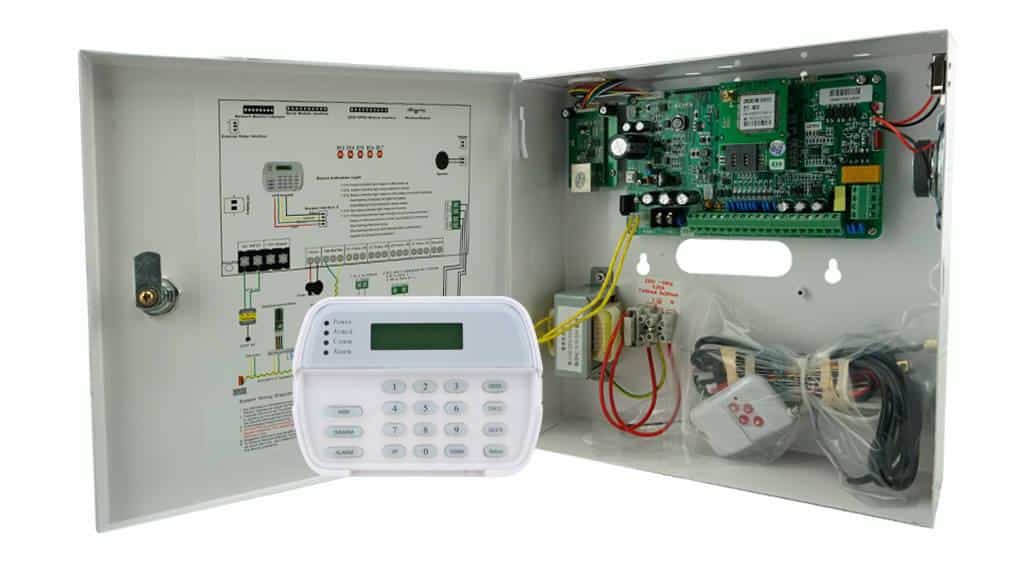
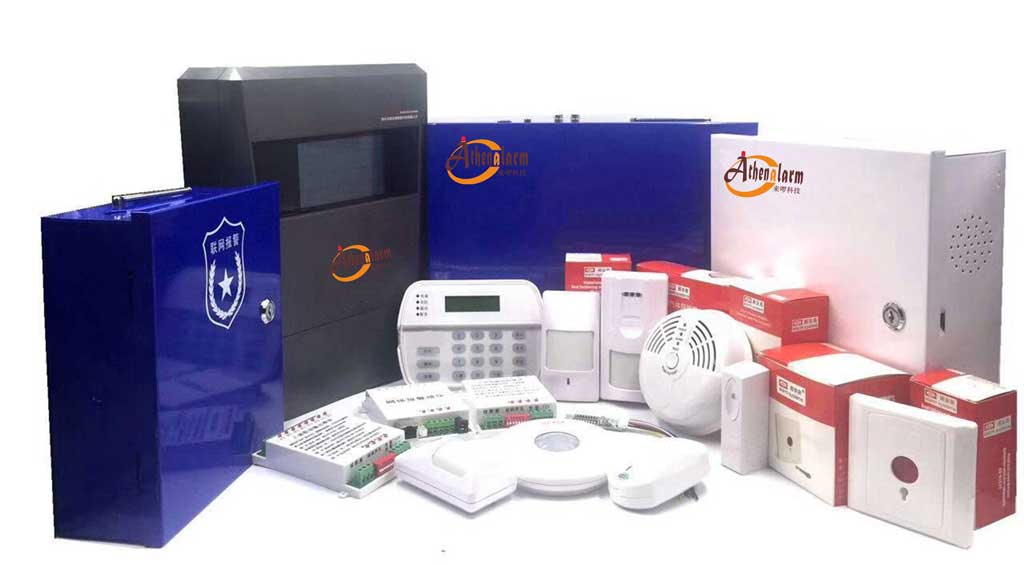
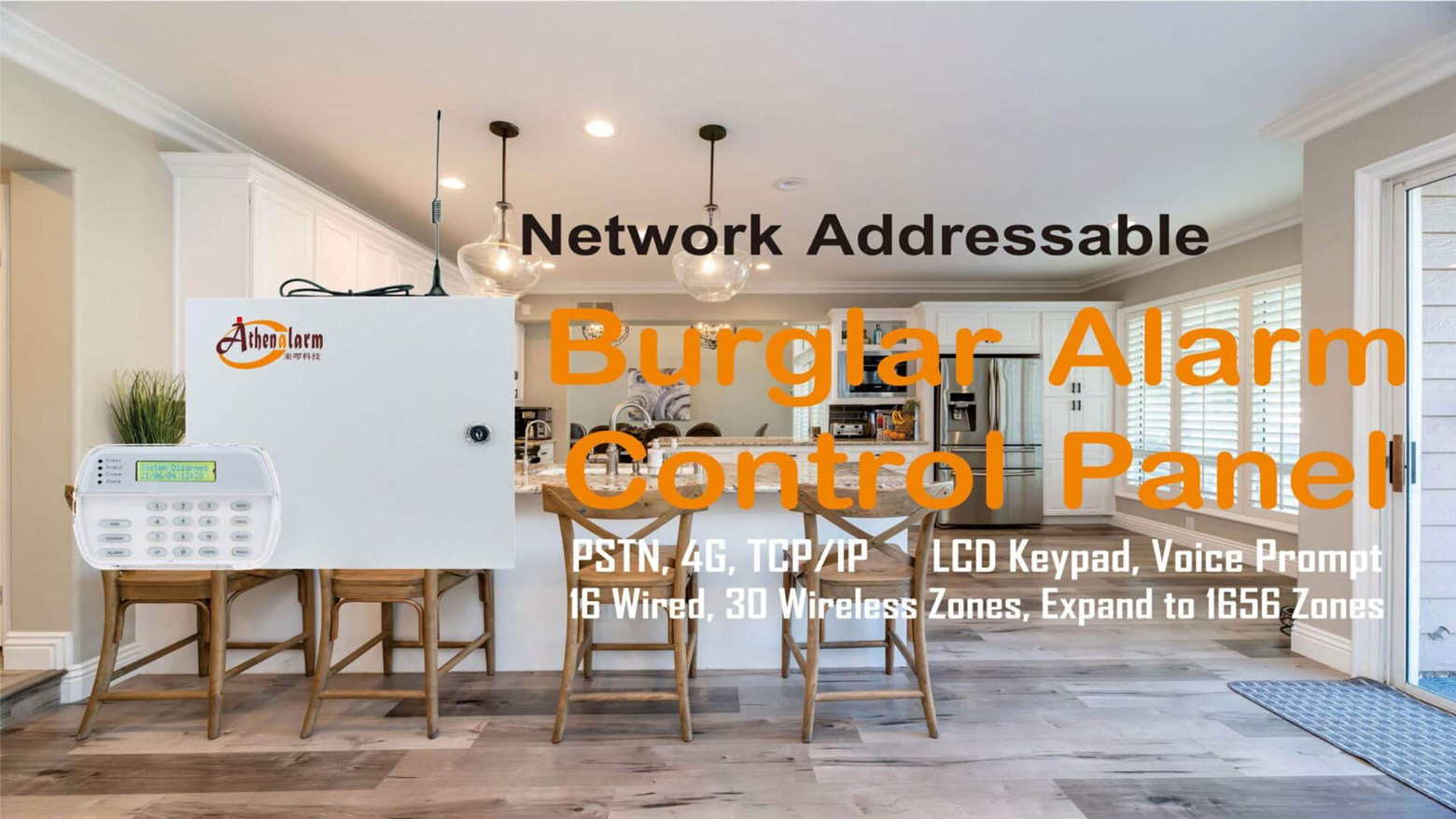
Athenalarm is a useful example of how a manufacturer can cover that stack rather than just the panel. Its AS-9000 series alarm control panel is an addressable, RS-485-based commercial intrusion platform built around a 32-bit ARM control core, supporting 16 wired zones and 30 wireless zones on the base panel with expansion up to roughly 1,656 bus zones through address modules — architecture aimed squarely at the multi-site, multi-building scenario described above rather than a single small installation. The line ships in PSTN, TCP/IP, and 4G/GPRS communicator variants (AS-9000FX, AS-9000IP, AS-9000GPRS-4G, AS-9000FF), which lets a distributor match communication path to site infrastructure — legacy PSTN branch, IP-native new build, or cellular-first remote site — without switching product families. On the monitoring side, Athenalarm pairs the panel platform with network alarm center management software, and its published specifications include tamper, AC-fail, and battery-fault supervision, a 1,500-event onboard history log, and surge protection rated to 4kV — the kind of environmental and diagnostic detail that matters more once a panel is deployed at scale than it does in a single demo unit. The company also runs OEM/ODM services for distributors building a private-label line, which is where the platform argument matters most: a distributor isn’t just buying panels, but a documented, communication-flexible, expandable architecture with a support path attached.
For any manufacturer being evaluated this way — Athenalarm included — the right question isn’t “does the datasheet look complete,” but “has this specific reporting path been validated against our receiver, and can this company document it.”
| Buyer requirement | Required platform capability | Deployment relevance |
|---|---|---|
| Multi-site, multi-building scaling | Addressable RS-485 expansion architecture | Avoids re-architecting per project |
| Legacy + modern site coverage | Multiple communicator variants (PSTN/IP/4G) on one panel line | One product line covers mixed infrastructure |
| Central-station operations | Network alarm center management software | Connects panel platform to monitoring workflow |
| Diagnostics and lifecycle support | Event/black-box logging, documented fault categories | Reduces field troubleshooting time |
| Channel strategy | OEM/ODM support | Enables private-label distribution |
Frequently Asked Questions
What is the difference between a security alarm manufacturer and a security system manufacturer in commercial intrusion projects?
A security alarm manufacturer produces panels, detectors, and accessories as standalone hardware. A security system manufacturer additionally supports communication architecture, central-station/CMS compatibility, monitoring software integration, deployment documentation, and OEM/post-sales support — the difference between buying a box and buying a platform.
What should alarm distributors verify before choosing a commercial alarm panel manufacturer?
Confirm central-station reporting compatibility against your actual receiver, documented failover behavior for communication redundancy, RS-485/addressable expansion architecture for scalability, event-log and remote diagnostic capability, and real channel support — documentation, training, and an engineering escalation path.
How do commercial intrusion alarm panels communicate with a central station?
A detector event is processed by the control panel, formatted by a communicator (PSTN, IP, or cellular), sent over a primary or backup transport path, received and parsed by the CMS or alarm receiver, and presented to an operator for acknowledgment, escalation, or video verification.
Contact ID vs SIA DC-09: which matters for modern alarm monitoring?
Contact ID remains practical in legacy and mixed-infrastructure estates, particularly where PSTN or older receivers are still in place. SIA DC-09 is built for IP-native and cellular transport and fits better in modern monitored deployments with richer or encrypted reporting requirements. Most commercial rollouts need both, mapped to site infrastructure rather than chosen once for the whole portfolio.
What communication redundancy should a commercial intrusion panel support?
A defined primary and backup path, documented failover thresholds, heartbeat or polling supervision, communication-loss event reporting to the CMS, and clean failback behavior once the primary path is restored — not just the presence of a second radio module.
What causes alarm reporting failures between a panel and CMS?
Most failures trace back to configuration and mapping mismatches rather than hardware defects: account or receiver-format mismatches, untested backup paths, unsynchronized zone/partition naming, and supervision intervals that don’t match real network conditions at the site.
Conclusion: What Professional Buyers Should Expect from Security Alarm Manufacturers
Cost still matters, but it is not the axis that determines whether a commercial intrusion deployment succeeds. Interoperability, communication resilience, and serviceability are. Most alarm reporting failures happen at the panel-to-CMS interface, not inside the panel itself — which means manufacturer evaluation has to include protocol support, failover behavior, and post-sales serviceability, not just hardware specifications.
Three pillars summarize the evaluation framework this guide has laid out:
- Central-station interoperability — validated reporting formats, event-code mapping, and account structure, tested against your actual receiver before rollout.
- Multi-path communication resilience — documented failover thresholds, supervision intervals, and failback behavior, not a brochure claim.
- Scalable, serviceable panel architecture — addressable expansion, diagnostic logging, and firmware discipline that hold up across a multi-site deployment.
The manufacturers worth building a channel around are the ones that act as architecture partners rather than component suppliers — able to support panel platform standardization, monitoring-center integration, OEM operations, and long-term technical support as a distributor scales from one project to a full regional rollout. That is the standard a security alarm manufacturer should be measured against in 2026, and it’s a higher bar than the one most procurement comparisons stop at.